 Business
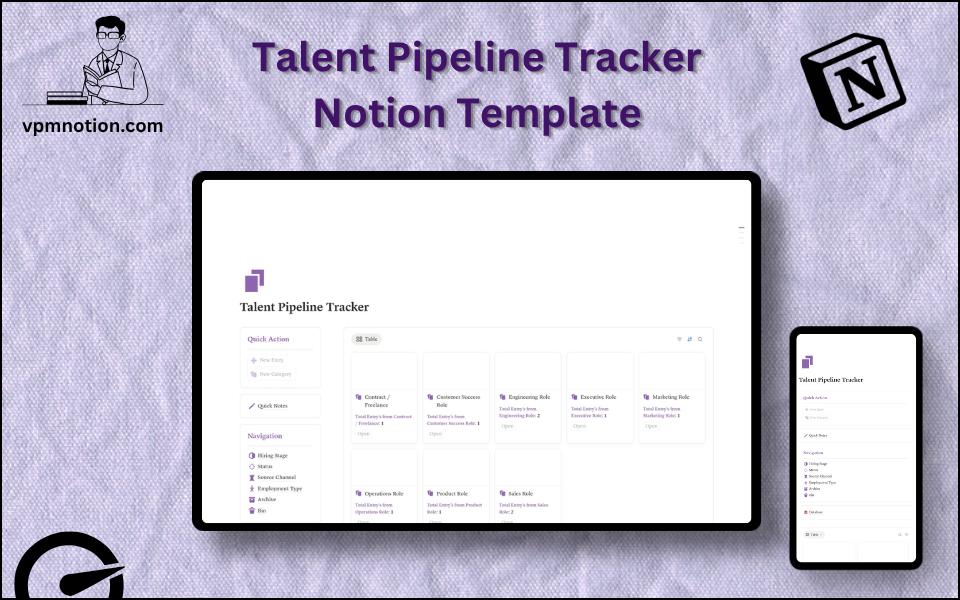
Talent Pipeline Tracker Notion Template
Human Resources & Recruitment Management
A comprehensive recruiting system built for HR professionals and hiring managers who need to track candidates, manage hiring stages, and maintain a clear view of the entire talent pipeline — all within Notion.
One-click duplication · Works on free Notion plans · Lifetime access
Overview
A comprehensive recruiting system built for HR professionals and hiring managers who need to track candidates, manage hiring stages, and maintain a clear view of the entire talent pipeline — all within Notion.
Key Features
- Quick Action Buttons — add new candidates or update pipeline records instantly
- Quick Notes Page — a dedicated space for meeting notes, recruiter observations, and follow-up reminders
- Navigation Panel with filtered views:
- Hiring Stage
- Status
- Source Channel
- Employment Type
- Archive
- Bin
- Dashboard Summary Database — inline database showing active pipeline at a glance
- Full Pipeline Database — complete candidate records with all properties
What's Inside
Dashboard Layout
Two-column layout:
- Left column: Quick Action callout, Quick Notes link, Navigation panel with 6 filtered views, Database shortcut
- Right column: Inline summary database showing the most recent or active candidates
Databases Included
- Pipeline Overview Database — summary view of candidates by current status
- Full Candidate Database — detailed records with fields including:
- Candidate name
- Role applied for
- Hiring stage
- Status (Active, On Hold, Rejected, Hired)
- Source channel (LinkedIn, Referral, Job Board, etc.)
- Employment type (Full-time, Part-time, Contract, Intern)
- Notes and next steps
Navigation Views
- Hiring Stage — groups candidates by interview round or hiring phase
- Status — filters by Active, Rejected, On Hold, Hired
- Source Channel — shows where candidates are coming from
- Employment Type — separates contractors from full-time hires
- Archive — completed or closed roles
- Bin — deleted or spam entries
Use Cases
- Managing multiple open positions simultaneously
- Tracking sourcing effectiveness across channels (LinkedIn vs. referrals vs. job boards)
- Preparing weekly recruiting status reports for leadership
- Keeping a historical record of past candidates for future openings
- Coordinating between multiple hiring managers using shared Notion workspace
Why You'll Love It
- Covers the full recruitment lifecycle from sourcing to hire
- Multiple filtered views let recruiters quickly segment candidates by stage, source, or type
- Archive and Bin views keep the active pipeline clean without losing historical data
- Quick Notes page supports collaborative notes without cluttering candidate records
- Quick action buttons reduce data entry time during high-volume hiring
- Employment Type filter helps manage contract, full-time, part-time, and intern hiring in one place
Benefits
- Full Visibility — every candidate's status, source, and stage visible in one place
- Time-Saving — quick action buttons and filtered views reduce navigation overhead
- Data-Driven — source channel tracking helps evaluate recruiting ROI
- Organised — archive and bin keep the pipeline tidy without deleting useful data
- Scalable — works equally well for a 5-person startup or a 500-person enterprise hiring team
Who It's For
- HR Managers overseeing end-to-end recruitment
- Recruiters managing multiple job requisitions
- Startup Founders doing their own early-stage hiring
- Talent Acquisition Teams who need a lightweight ATS alternative
- Small business owners tracking a handful of open roles
How It Works
- Create a New Candidate — use Quick Action button to add a new record to the pipeline
- Fill in Details — assign role, hiring stage, source channel, employment type, and status
- Progress Through Stages — update hiring stage as candidate moves through phone screen, interviews, and offer
- Log Notes — use the Quick Notes page to capture recruiter impressions and next steps
- Filter by View — switch between Hiring Stage, Status, or Source Channel views for focused analysis
- Archive Closed Roles — when a position is filled or cancelled, move all related entries to Archive
- Review Pipeline Health — use the dashboard summary weekly to spot bottlenecks in the funnel
Frequently Asked Questions
What is the Talent Pipeline Tracker Notion template?
Human Resources & Recruitment Management. A comprehensive recruiting system built for HR professionals and hiring managers who need to track candidates, manage hiring stages, and maintain a clear view of the entire talent pipeline — all within Notion.
Is the Talent Pipeline Tracker template free?
Yes — Talent Pipeline Tracker is completely free. Add it to your cart for $0 and duplicate it straight into your own Notion workspace in one click.
Who is Talent Pipeline Tracker best for?
It's designed for HR Managers overseeing end-to-end recruitment; Recruiters managing multiple job requisitions; Startup Founders doing their own early-stage hiring.
What's included in Talent Pipeline Tracker?
Key components include Pipeline Overview Database, Full Candidate Database, Candidate name, Role applied for, Hiring stage.
Does Talent Pipeline Tracker work on the free Notion plan and on mobile?
Yes. It works on both free and paid Notion plans and is fully usable on desktop, tablet, and the Notion mobile app. Just duplicate it to your workspace and start straight away.
Summary
The Talent Pipeline Tracker Notion template is a clean, structured recruiting tool that eliminates the need for complex ATS software for small to mid-size hiring teams. It tracks candidates from sourcing to hire, organises them by multiple dimensions, and keeps historical data accessible without cluttering the active pipeline. Perfect for recruiters, HR managers, and hiring managers who want a flexible, easy-to-use system inside their existing Notion workspace.
No cost — yours in one click
6 sold
Get it Free- Instant Notion duplication
- Desktop, tablet & mobile
- Beginner-friendly setup
Related templates
Get Talent Pipeline Tracker today
The Talent Pipeline Tracker Notion template is a clean, structured recruiting tool that eliminates the need for complex ATS software for small to mid-size…
Get it Free