 Business
Sales Pipeline System Notion Template
Sales Management & CRM
A streamlined sales pipeline and CRM system for small teams and solo sales professionals who need to track leads, manage deal stages, and close revenue — without the complexity of enterprise CRM software. Built natively…
One-click duplication · Works on free Notion plans · Lifetime access
Overview
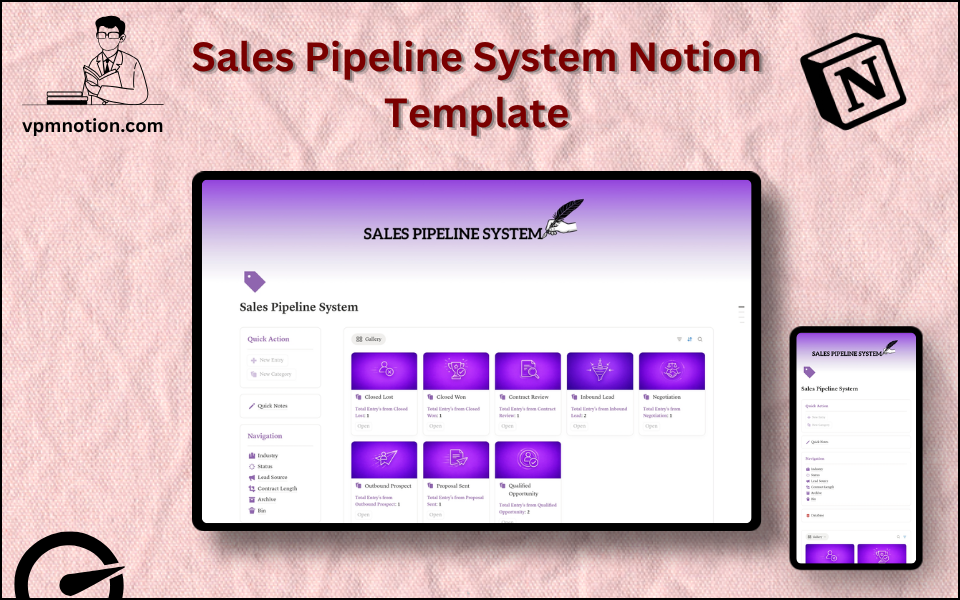
A streamlined sales pipeline and CRM system for small teams and solo sales professionals who need to track leads, manage deal stages, and close revenue — without the complexity of enterprise CRM software. Built natively in Notion, it centralises all sales activity in one clean, actionable dashboard.
Key Features
- Quick Action Buttons — add new leads or update deals instantly
- Quick Notes Page — log call notes, sales scripts, and client-specific observations
- Navigation Panel with filtered views:
- Industry
- Status
- Lead Source
- Contract Length
- Archive
- Bin
- Dashboard Summary Database — inline view of active deals
- Full Pipeline Database — complete CRM record for every lead and opportunity
What's Inside
Dashboard Layout
Two-column layout:
- Left column: Quick Action callout, Quick Notes link, Navigation panel with 6 views, Database shortcut
- Right column: Inline summary database with active pipeline deals
Databases Included
- Pipeline Summary Database — active deals filtered by status and value
- Full CRM Database — all leads and opportunities with:
- Lead/Company name and contact
- Industry / vertical
- Deal stage (Prospecting, Qualified, Proposal, Negotiation, Closed Won, Closed Lost)
- Status
- Lead source (Inbound, Referral, Cold Outreach, Event, Partnership)
- Contract length (Monthly, Quarterly, Annual, One-time)
- Deal value
- Notes and next steps
Navigation Views
- Industry — segments pipeline by sector for targeted review
- Status — filters by deal stage
- Lead Source — tracks acquisition channel effectiveness
- Contract Length — separates recurring vs. project-based revenue
- Archive — closed or inactive deals preserved for historical reference
- Bin — invalid or duplicate entries
Use Cases
- Managing a B2B sales pipeline for a SaaS, agency, or consulting business
- Tracking outbound cold outreach campaigns and response rates
- Forecasting monthly or quarterly revenue based on pipeline stage and deal value
- Running sales retrospectives to identify where deals are lost most often
- Managing follow-up schedules for warm leads and active opportunities
- Building a CRM from scratch for a new business or side project
Why You'll Love It
- Lead Source tracking reveals which channels generate the highest-value opportunities
- Contract Length filtering helps forecast recurring vs. one-time revenue
- Industry view supports targeted outreach and vertical-specific sales strategies
- Status tracking provides a clear picture of pipeline health at every stage
- Archive prevents deal history from being lost when leads go cold or close
- Lightweight alternative to Salesforce or HubSpot for teams that live in Notion
Benefits
- Revenue Visibility — full pipeline view makes forecasting simple and reliable
- Channel Intelligence — lead source data shows what acquisition strategy is working
- Deal Focus — status filtering prevents sales reps from wasting time on dead leads
- Simplicity — no complex setup, no expensive subscriptions, no learning curve
- Flexibility — adapts to any sales process — from simple two-stage to complex enterprise cycles
Who It's For
- Sales Representatives managing their own book of business
- Founders running their own early-stage sales process
- Freelancers tracking client enquiries and proposals
- Small sales teams (2–10 reps) who don't need full CRM complexity
- Consultants managing proposal pipelines and client renewals
How It Works
- Add a Lead — use Quick Action to create a new lead/opportunity record
- Fill in Properties — assign industry, lead source, contract length, and initial status
- Move Through Stages — update deal stage as the lead progresses (Prospecting → Qualified → Proposal → Closed)
- Log Call Notes — use Quick Notes page to capture key conversation highlights
- Review by Lead Source — identify which channels are producing the most pipeline
- Forecast Revenue — use Contract Length and deal value to estimate monthly/quarterly revenue
- Handle Cold Leads — archive deals that have gone quiet to keep active pipeline clean
- Weekly Pipeline Review — use Status view to prepare for team sales meetings
Frequently Asked Questions
What is the Sales Pipeline System Notion template?
Sales Management & CRM. A streamlined sales pipeline and CRM system for small teams and solo sales professionals who need to track leads, manage deal stages, and close revenue — without the complexity of enterprise CRM software.
How much does Sales Pipeline System cost?
Sales Pipeline System is a premium Notion template available for a one-time payment of $5 — no subscription. After checkout you can duplicate it into your Notion workspace and own it forever.
Who is Sales Pipeline System best for?
It's designed for Sales Representatives managing their own book of business; Founders running their own early-stage sales process; Freelancers tracking client enquiries and proposals.
What's included in Sales Pipeline System?
Key components include Pipeline Summary Database, Full CRM Database, Lead/Company name and contact, Industry / vertical, Deal stage (Prospecting, Qualified, Proposal, Negotiation, Closed Won, Closed Lost).
Does Sales Pipeline System work on the free Notion plan and on mobile?
Yes. It works on both free and paid Notion plans and is fully usable on desktop, tablet, and the Notion mobile app. Just duplicate it to your workspace and start straight away.
Summary
The Sales Pipeline System Notion template is a clean, practical CRM for sales professionals and founders who want full pipeline visibility without the overhead of enterprise software. By tracking leads from first contact to closed deal, with source attribution and contract data, it provides everything needed to run an effective, data-informed sales process — all within Notion.
One-time payment · lifetime access
Get Template — $5- Instant Notion duplication
- Desktop, tablet & mobile
- Beginner-friendly setup
Related templates
Get Sales Pipeline System today
The Sales Pipeline System Notion template is a clean, practical CRM for sales professionals and founders who want full pipeline visibility without the overhead…
Get Template — $5