 Business
Agile Sprint System Notion Template
Agile Project Management & Software Development
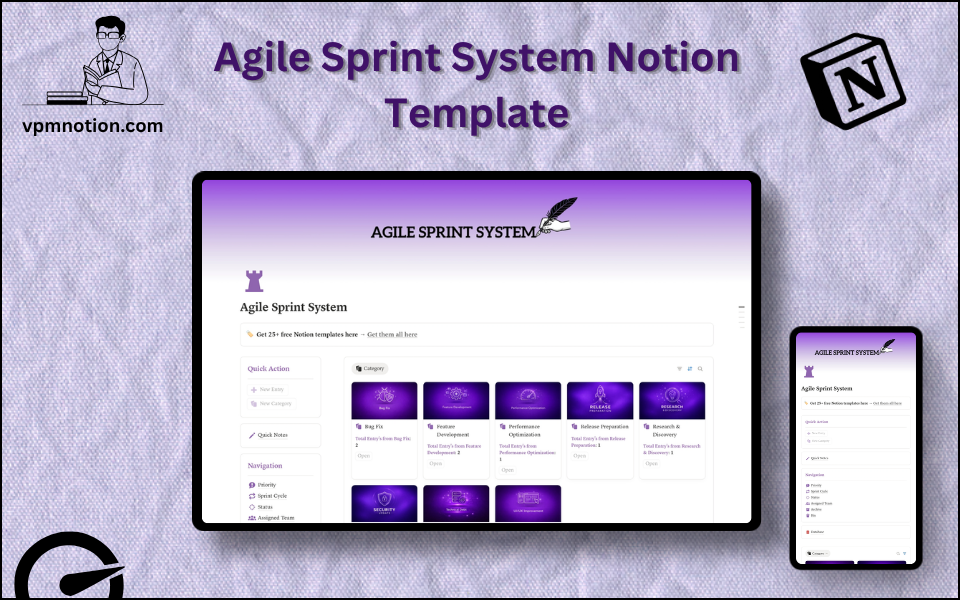
A complete Agile sprint management system for software development teams and product managers who run iterative development cycles. This template provides the structure to plan sprints, assign tasks to team members…
One-click duplication · Works on free Notion plans · Lifetime access
Overview
A complete Agile sprint management system for software development teams and product managers who run iterative development cycles. This template provides the structure to plan sprints, assign tasks to team members, track progress by priority and status, and review completed work — all within Notion.
Key Features
- Quick Action Buttons — add new sprint tasks (user stories, bugs, or features) quickly
- Quick Notes Page — sprint planning notes, retrospective observations, and team decisions
- Navigation Panel with filtered views:
- Priority
- Sprint Cycle
- Status
- Assigned Team
- Archive
- Bin
- Dashboard Summary Database — inline view of the current sprint's active tasks
- Full Sprint Database — complete backlog and sprint task records
What's Inside
Dashboard Layout
Two-column layout:
- Left column: Quick Action callout, Quick Notes link, Navigation panel with 6 views, Database shortcut
- Right column: Inline summary database with current sprint tasks
Databases Included
- Sprint Overview Database — active sprint tasks filtered by status
- Full Sprint Backlog Database — all tasks, user stories, and bugs with:
- Task name and description
- Priority (P0/Critical, P1/High, P2/Medium, P3/Low)
- Sprint cycle (Sprint 1, Sprint 2, etc. or date-based sprint labels)
- Status (Backlog, Sprint Ready, In Progress, In Review, Done, Blocked)
- Assigned team (Frontend, Backend, QA, Design, DevOps, etc.)
- Story points / effort estimate
- Linked feature or epic
- Notes and acceptance criteria
Navigation Views
- Priority — surfaces critical and high-priority items for sprint planning
- Sprint Cycle — filters by specific sprint to show only current sprint work
- Status — provides a Kanban-style status view of the sprint
- Assigned Team — lets each team see their sprint tasks
- Archive — completed sprint records for velocity analysis and retrospectives
- Bin — removed or duplicate backlog items
Use Cases
- Running 1-week or 2-week Agile sprints for product development teams
- Managing a product backlog with priority and effort estimation
- Coordinating multi-team sprints with separate team assignment filtering
- Conducting sprint planning by moving backlog items into the current sprint cycle
- Running retrospectives using archived sprint data and Quick Notes observations
- Tracking bug fixes and technical debt alongside feature development
Why You'll Love It
- Sprint Cycle filtering is purpose-built for Agile teams running weekly or bi-weekly sprints
- Priority view ensures the highest-value work is visible and addressed first
- Assigned Team filter supports multi-team organisations (Frontend, Backend, QA, Design, etc.)
- Status tracking mirrors standard Agile workflow: Backlog → In Progress → In Review → Done
- Archive preserves completed sprint work for velocity tracking and retrospectives
- Lightweight alternative to Jira or Linear for teams that prefer Notion as their central workspace
Benefits
- Sprint Focus — sprint cycle filtering eliminates backlog noise during active sprints
- Team Coordination — assigned team views keep each squad focused on their work
- Velocity Tracking — archived sprints provide data for capacity and planning estimates
- Agile Flexibility — adapts to Scrum, Kanban, or hybrid methodologies
- Simplicity — no complex tool configuration; works out of the box in Notion
Who It's For
- Software Development Teams running Agile or Scrum processes
- Product Managers planning and tracking sprint delivery
- Startup CTOs building development discipline in early-stage teams
- Indie developers who want a lightweight Agile system without enterprise tools
- Design and Creative Teams adapting Agile principles to creative sprints
How It Works
- Build the Backlog — add all planned features, bugs, and tasks to the database
- Sprint Planning — use Priority view to identify top items; assign them to the current Sprint Cycle
- Assign Teams — tag each task with the responsible team
- Sprint Kick-off — update statuses to "In Progress" as work begins
- Daily Standup — use Status view to review blocked, in-progress, and completed items
- Code Review — move completed tasks to "In Review" status
- Sprint Close — mark all completed tasks as "Done"; archive the sprint
- Retrospective — use Quick Notes to capture what went well, what didn't, and sprint velocity
Frequently Asked Questions
What is the Agile Sprint System Notion template?
Agile Project Management & Software Development. A complete Agile sprint management system for software development teams and product managers who run iterative development cycles.
Is the Agile Sprint System template free?
Yes — Agile Sprint System is completely free. Add it to your cart for $0 and duplicate it straight into your own Notion workspace in one click.
Who is Agile Sprint System best for?
It's designed for Software Development Teams running Agile or Scrum processes; Product Managers planning and tracking sprint delivery; Startup CTOs building development discipline in early-stage teams.
What's included in Agile Sprint System?
Key components include Sprint Overview Database, Full Sprint Backlog Database, Task name and description, Priority (P0/Critical, P1/High, P2/Medium, P3/Low), Sprint cycle (Sprint 1, Sprint 2, etc. or date-based sprint labels).
Does Agile Sprint System work on the free Notion plan and on mobile?
Yes. It works on both free and paid Notion plans and is fully usable on desktop, tablet, and the Notion mobile app. Just duplicate it to your workspace and start straight away.
Summary
The Agile Sprint System Notion template gives software development teams and product managers the Agile infrastructure they need to ship fast and stay organised. With sprint-cycle filtering, priority management, team assignment, and a full backlog database, it replicates the functionality of dedicated Agile tools — all within the Notion workspace your team already uses.
No cost — yours in one click
15 sold
Get it Free- Instant Notion duplication
- Desktop, tablet & mobile
- Beginner-friendly setup
Related templates
Get Agile Sprint System today
The Agile Sprint System Notion template gives software development teams and product managers the Agile infrastructure they need to ship fast and stay…
Get it Free