 Business
IT Asset Manager Notion Template
IT Infrastructure & Asset Management
A structured IT asset tracking system for IT teams, operations managers, and system administrators who need to manage hardware, software licenses, and technology assets across an organisation. This template tracks each…
One-click duplication · Works on free Notion plans · Lifetime access
Overview
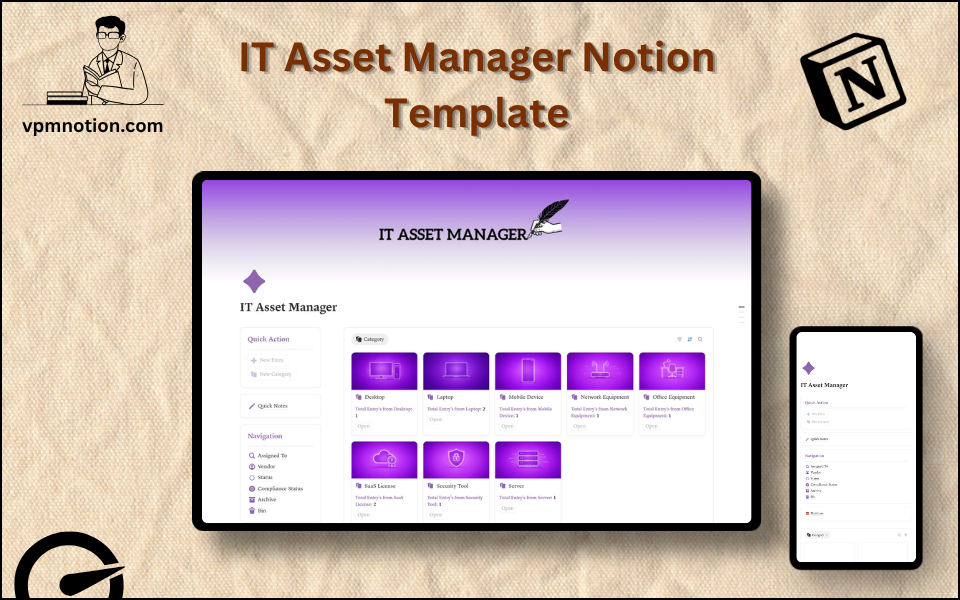
A structured IT asset tracking system for IT teams, operations managers, and system administrators who need to manage hardware, software licenses, and technology assets across an organisation. This template tracks each asset's assignment, vendor, compliance status, and lifecycle stage in one centralised Notion workspace.
Key Features
- Quick Action Buttons — log new assets or update existing records quickly
- Quick Notes Page — IT notes, maintenance logs, vendor communications, and procurement plans
- Navigation Panel with filtered views:
- Assigned To
- Vendor
- Status
- Compliance Status
- Archive
- Bin
- Dashboard Summary Database — inline overview of active IT assets
- Full Asset Database — complete inventory of all IT assets with detailed records
What's Inside
Dashboard Layout
Two-column layout:
- Left column: Quick Action callout, Quick Notes link, Navigation panel with 6 views, Database shortcut
- Right column: Inline summary database with active asset inventory
Databases Included
- Asset Overview Database — active assets filtered by status and assigned user
- Full IT Asset Database — all assets with:
- Asset name and type (Laptop, Monitor, Server, SaaS License, Phone, etc.)
- Assigned to (employee name or department)
- Vendor / supplier
- Status (In Use, Available, Under Repair, Retired, Lost, Pending Delivery)
- Compliance status (Compliant, Non-Compliant, Under Review, Exempt)
- Purchase date and warranty/license expiry
- Serial number, model, and cost
- Notes and maintenance history
Navigation Views
- Assigned To — shows all assets assigned to a specific person or department
- Vendor — groups assets by supplier for vendor management and renewals
- Status — filters by asset lifecycle stage
- Compliance Status — flags non-compliant assets for security review
- Archive — decommissioned or retired assets with full history
- Bin — duplicate or erroneous entries
Use Cases
- Building and maintaining a complete IT hardware and software inventory
- Tracking laptop assignments across a remote or hybrid workforce
- Managing SaaS license counts to avoid over- or under-provisioning
- Monitoring warranty and license expiry dates for proactive renewal
- Preparing for IT security audits with compliance status documentation
- Planning hardware refresh cycles based on purchase dates and asset age
Why You'll Love It
- Compliance Status tracking supports security audits and regulatory requirements
- Vendor filter enables vendor-specific reviews for renewals, SLAs, and procurement
- Assigned To view makes it easy to see which team member is responsible for each device or license
- Status tracking manages the full asset lifecycle: from procurement to decommission
- Archive preserves decommissioned asset records for financial and audit purposes
- Works for hardware assets (laptops, servers, phones) and software licenses equally
Benefits
- Audit Readiness — compliance status tracking supports security and ISO audits
- Cost Control — full asset inventory prevents over-purchasing duplicate or unused assets
- Accountability — assignment tracking ensures every asset has a responsible owner
- Vendor Management — vendor-filtered view streamlines renewal and procurement decisions
- Lifecycle Visibility — status tracking prevents assets from being lost or forgotten
Who It's For
- IT Managers and Administrators managing organisational technology assets
- Operations Teams at companies without a dedicated IT department
- Startup CTOs building IT infrastructure processes from scratch
- Finance Teams tracking technology capex and opex
- Compliance and Security Officers managing asset compliance documentation
How It Works
- Add an Asset — use Quick Action to log a new asset with name, type, and purchase details
- Assign the Asset — tag the employee or department receiving the asset
- Set Vendor and Status — record the supplier and set status to "In Use" or "Available"
- Flag Compliance — mark each asset as Compliant or Non-Compliant based on security policies
- Track Assigned Assets — use Assigned To view to see each employee's technology footprint
- Manage Renewals — use Vendor view to prepare for license renewals and contract negotiations
- Monitor Compliance — review Compliance Status view before audits and security reviews
- Decommission Assets — update status to "Retired" and archive with full history when disposing
Frequently Asked Questions
What is the IT Asset Manager Notion template?
IT Infrastructure & Asset Management. A structured IT asset tracking system for IT teams, operations managers, and system administrators who need to manage hardware, software licenses, and technology assets across an organisation.
Is the IT Asset Manager template free?
Yes — IT Asset Manager is completely free. Add it to your cart for $0 and duplicate it straight into your own Notion workspace in one click.
Who is IT Asset Manager best for?
It's designed for IT Managers and Administrators managing organisational technology assets; Operations Teams at companies without a dedicated IT department; Startup CTOs building IT infrastructure processes from scratch.
What's included in IT Asset Manager?
Key components include Asset Overview Database, Full IT Asset Database, Asset name and type (Laptop, Monitor, Server, SaaS License, Phone, etc.), Assigned to (employee name or department), Vendor / supplier.
Does IT Asset Manager work on the free Notion plan and on mobile?
Yes. It works on both free and paid Notion plans and is fully usable on desktop, tablet, and the Notion mobile app. Just duplicate it to your workspace and start straight away.
Summary
The IT Asset Manager Notion template gives IT teams the visibility and structure to manage the full lifecycle of every technology asset in the organisation. From procurement to decommission, with compliance tracking and vendor management, it replaces scattered spreadsheets with a searchable, organised, and audit-ready IT asset database. Essential for any organisation that takes IT governance seriously.
No cost — yours in one click
8 sold
Get it Free- Instant Notion duplication
- Desktop, tablet & mobile
- Beginner-friendly setup
Related templates
Get IT Asset Manager today
The IT Asset Manager Notion template gives IT teams the visibility and structure to manage the full lifecycle of every technology asset in the organisation…
Get it Free