 Business
Client Relationship Manager Notion Template
CRM & Client Success Management
A relationship-focused CRM template for managing client accounts, tracking engagement levels, and ensuring customer success. Designed for account managers, client success teams, and service businesses that prioritise…
One-click duplication · Works on free Notion plans · Lifetime access
Overview
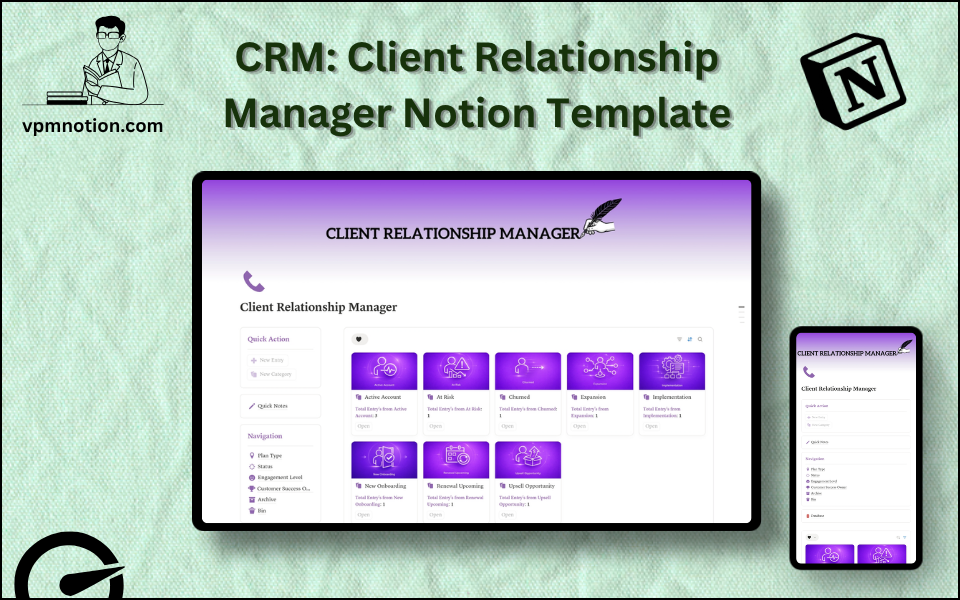
A relationship-focused CRM template for managing client accounts, tracking engagement levels, and ensuring customer success. Designed for account managers, client success teams, and service businesses that prioritise long-term client relationships over transactional interactions.
Key Features
- Quick Action Buttons — create new client records or update account details quickly
- Quick Notes Page — log client meeting notes, relationship history, and account observations
- Navigation Panel with filtered views:
- Plan Type
- Status
- Engagement Level
- Customer Success Owner
- Archive
- Bin
- Dashboard Summary Database — inline overview of active client accounts
- Full CRM Database — complete records for all client relationships
What's Inside
Dashboard Layout
Two-column layout:
- Left column: Quick Action callout, Quick Notes link, Navigation panel with 6 views, Database shortcut
- Right column: Inline summary database with active client accounts
Databases Included
- Client Overview Database — active accounts filtered by engagement level and status
- Full CRM Database — all client records with:
- Client / company name
- Contact person and role
- Plan type (Starter, Growth, Enterprise, Custom, Retainer, etc.)
- Status (Active, At Risk, Churned, Onboarding, Renewing)
- Engagement level (Highly Engaged, Moderately Engaged, Low Engagement, Inactive)
- Customer Success Owner
- Notes and action items
- Contract start/end dates and renewal status
Navigation Views
- Plan Type — groups clients by service tier or package
- Status — filters by account health status
- Engagement Level — highlights clients needing attention
- Customer Success Owner — filters accounts by responsible team member
- Archive — churned or concluded client relationships
- Bin — invalid or duplicate entries
Use Cases
- Managing a portfolio of SaaS or subscription clients with tiered plan levels
- Tracking client health scores to proactively prevent churn
- Coordinating handoffs between sales and customer success teams
- Running quarterly business reviews (QBRs) with structured account notes
- Identifying upsell opportunities among high-engagement clients
- Onboarding new clients with structured workflows and progress tracking
Why You'll Love It
- Engagement Level tracking identifies at-risk clients before they churn
- Customer Success Owner assignment ensures every client has a dedicated point of contact
- Plan Type filtering helps manage clients across different tiers, packages, or service levels
- Status tracking provides a real-time view of account health across the portfolio
- Archive preserves churned or completed client records without removing them from history
- Bridges the gap between sales CRM and post-sale client management
Benefits
- Churn Prevention — engagement level tracking surfaces at-risk clients before it's too late
- Account Ownership — clear CSM assignment prevents clients from feeling neglected
- Relationship History — notes and archive maintain a full record of every interaction
- Upsell Intelligence — engagement data highlights clients ready for plan upgrades
- Team Alignment — shared workspace keeps sales and success teams on the same page
Who It's For
- Customer Success Managers managing post-sale client relationships
- Account Managers overseeing multi-client portfolios
- Agency Account Leads managing client relationships and deliverables
- SaaS founders doing their own customer success in early stages
- Consultants maintaining long-term client relationships
How It Works
- Add a Client — use Quick Action to create a new account record
- Set Plan and Owner — assign the service plan and Customer Success Owner
- Log Onboarding — set status to "Onboarding" and track progress in notes
- Monitor Engagement — regularly update engagement level based on usage and communication
- Flag At-Risk Accounts — use Engagement Level view to identify low-engagement clients
- Run QBRs — use Quick Notes to prepare and log quarterly business review outcomes
- Track Renewals — use contract end dates and renewal status to prepare for renewal conversations
- Archive Churned Clients — preserve churned account records in Archive for win/loss analysis
Frequently Asked Questions
What is the Client Relationship Manager Notion template?
CRM & Client Success Management. A relationship-focused CRM template for managing client accounts, tracking engagement levels, and ensuring customer success.
How much does Client Relationship Manager cost?
Client Relationship Manager is a premium Notion template available for a one-time payment of $5 — no subscription. After checkout you can duplicate it into your Notion workspace and own it forever.
Who is Client Relationship Manager best for?
It's designed for Customer Success Managers managing post-sale client relationships; Account Managers overseeing multi-client portfolios; Agency Account Leads managing client relationships and deliverables.
What's included in Client Relationship Manager?
Key components include Client Overview Database, Full CRM Database, Client / company name, Contact person and role, Plan type (Starter, Growth, Enterprise, Custom, Retainer, etc.).
Does Client Relationship Manager work on the free Notion plan and on mobile?
Yes. It works on both free and paid Notion plans and is fully usable on desktop, tablet, and the Notion mobile app. Just duplicate it to your workspace and start straight away.
Summary
The Client Relationship Manager Notion template is the customer success and account management hub your team needs to keep clients happy, engaged, and renewing. With engagement level tracking, plan-based segmentation, and dedicated CSM ownership, it transforms client management from reactive to proactive. Perfect for any team that values client relationships as a core business driver.
One-time payment · lifetime access
Get Template — $5- Instant Notion duplication
- Desktop, tablet & mobile
- Beginner-friendly setup
Related templates
Get Client Relationship Manager today
The Client Relationship Manager Notion template is the customer success and account management hub your team needs to keep clients happy, engaged, and…
Get Template — $5