 Marketing & Creative
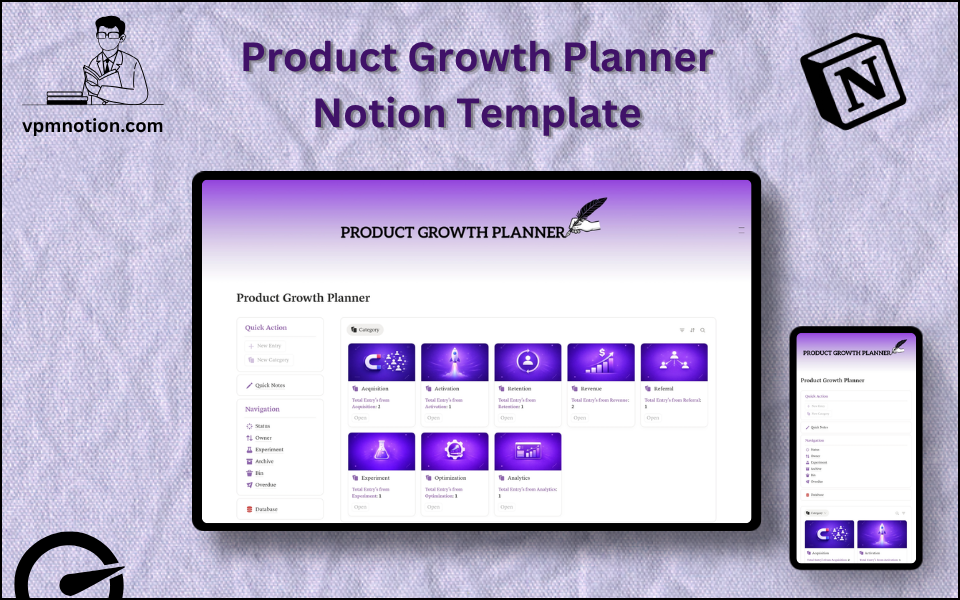
Product Growth Planner Notion Template
Product Management & Growth Strategy
A structured product growth management system for product managers and growth teams to plan initiatives, track experiments, assign ownership, and monitor progress — all in one Notion workspace. This template bridges the…
One-click duplication · Works on free Notion plans · Lifetime access
Overview
A structured product growth management system for product managers and growth teams to plan initiatives, track experiments, assign ownership, and monitor progress — all in one Notion workspace. This template bridges the gap between product strategy and execution by creating a visible, accountable growth pipeline.
Key Features
- Quick Action Buttons — add new growth initiatives or experiments quickly
- Quick Notes Page — strategy notes, growth hypotheses, and meeting outcomes
- Navigation Panel with filtered views:
- Status
- Owner
- Experiment
- Archive
- Bin
- Overdue
- Dashboard Summary Database — inline view of active growth initiatives
- Full Growth Database — complete record of all product growth tasks and experiments
What's Inside
Dashboard Layout
Two-column layout:
- Left column: Quick Action callout, Quick Notes link, Navigation panel with 6 views, Database shortcut
- Right column: Inline summary database with active growth initiatives
Databases Included
- Growth Summary Database — active initiatives filtered by status and priority
- Full Growth Database — all initiatives with:
- Initiative or experiment name
- Hypothesis and expected impact
- Status (Idea, Planned, In Progress, In Review, Completed, Deprioritised)
- Owner (PM, Growth Lead, Designer, Engineer, etc.)
- Experiment type (A/B Test, Feature Rollout, Pricing Test, Messaging Test, etc.)
- Target metric (Acquisition, Activation, Retention, Revenue, Referral)
- Due date and actual completion date
- Result and learnings
- Notes
Navigation Views
- Status — filters by initiative lifecycle stage
- Owner — shows each team member's assigned growth initiatives
- Experiment — filters specifically to A/B tests and validation experiments
- Archive — completed or deprioritised initiatives with results
- Bin — invalid or duplicate entries
- Overdue — initiatives that have passed their due date without completion
Use Cases
- Managing a product growth roadmap with prioritised initiatives across the AARRR funnel
- Running structured growth experiments with hypothesis-driven tracking
- Coordinating between product, engineering, design, and marketing on growth initiatives
- Reviewing growth performance in weekly or bi-weekly product reviews
- Building an institutional record of growth experiments, results, and learnings
- Preparing data-driven quarterly growth reports for leadership or investors
Why You'll Love It
- Experiment view is purpose-built for growth teams running A/B tests and validation cycles
- Overdue view proactively surfaces delayed initiatives before they impact roadmap delivery
- Owner assignment ensures growth initiatives always have a responsible product manager
- Status tracking moves initiatives through planning, execution, and evaluation stages
- Archive preserves completed growth work for retrospectives and reporting
- Works for early-stage startups building initial growth loops and mature product teams scaling acquisition
Benefits
- Growth Accountability — owner assignment ensures initiatives never become orphaned
- Experiment Discipline — dedicated Experiment view encourages structured testing
- Deadline Awareness — Overdue view prevents growth initiatives from silently slipping
- Learning Culture — results and learnings captured in every completed record
- Strategy Alignment — target metric tracking keeps all initiatives connected to growth goals
Who It's For
- Product Managers managing growth initiatives across multiple teams
- Growth Marketers running data-driven acquisition and retention experiments
- Startup Founders building their first growth system
- Growth Leads coordinating cross-functional product experiments
- Product Teams at B2B or B2C companies scaling user acquisition and retention
How It Works
- Add an Initiative — use Quick Action to log a new growth idea or planned experiment
- Write the Hypothesis — describe the expected impact and the metric being targeted
- Set Owner and Status — assign a responsible PM or lead and set status to "Planned"
- Begin Execution — update status to "In Progress" when work starts
- Run Experiments — use Experiment view to monitor all active A/B tests
- Check Overdue View — daily check for delayed initiatives needing attention
- Record Results — after completion, log the outcome and key learnings
- Archive Completed Work — preserve all results in Archive for retrospectives
- Quarterly Retrospective — review archived initiatives to identify patterns in successful growth strategies
Frequently Asked Questions
What is the Product Growth Planner Notion template?
Product Management & Growth Strategy. A structured product growth management system for product managers and growth teams to plan initiatives, track experiments, assign ownership, and monitor progress — all in one Notion workspace.
Is the Product Growth Planner template free?
Yes — Product Growth Planner is completely free. Add it to your cart for $0 and duplicate it straight into your own Notion workspace in one click.
Who is Product Growth Planner best for?
It's designed for Product Managers managing growth initiatives across multiple teams; Growth Marketers running data-driven acquisition and retention experiments; Startup Founders building their first growth system.
What's included in Product Growth Planner?
Key components include Growth Summary Database, Full Growth Database, Initiative or experiment name, Hypothesis and expected impact, Status (Idea, Planned, In Progress, In Review, Completed, Deprioritised).
Does Product Growth Planner work on the free Notion plan and on mobile?
Yes. It works on both free and paid Notion plans and is fully usable on desktop, tablet, and the Notion mobile app. Just duplicate it to your workspace and start straight away.
Summary
The Product Growth Planner Notion template is the strategic execution hub for product and growth teams who want to move faster, experiment smarter, and build a culture of learning. With owner accountability, experiment tracking, overdue visibility, and a full results archive, it gives growth teams the structure they need to turn ambitious ideas into measurable outcomes. An essential tool for any product-led growth strategy.
No cost — yours in one click
11 sold
Get it Free- Instant Notion duplication
- Desktop, tablet & mobile
- Beginner-friendly setup
Get Product Growth Planner today
The Product Growth Planner Notion template is the strategic execution hub for product and growth teams who want to move faster, experiment smarter, and build a…
Get it Free