 Lifestyle
Password Vault Notion Template
Secure Password & Credential Organiser
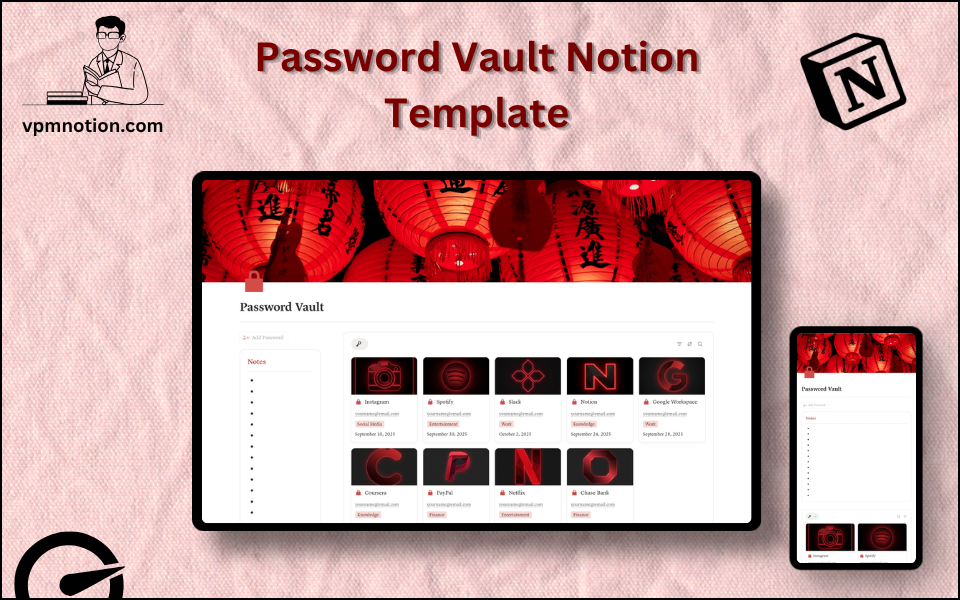
The Password Vault is a clean, organised Notion system for storing and managing all your logins, credentials, and account details in one place. Instead of scattered notes and forgotten passwords, it gives you a single…
One-click duplication · Works on free Notion plans · Lifetime access
Overview
The Password Vault is a clean, organised Notion system for storing and managing all your logins, credentials, and account details in one place. Instead of scattered notes and forgotten passwords, it gives you a single categorised database with security levels, status tracking, and space for backup codes — so every account you own is documented, sorted, and easy to find.
Key Features
- Central Password Database — one home for every login and credential you own
- Category Sorting — group accounts by Work, Finance, Entertainment, Social Media, and Knowledge
- Security Level Tagging — mark each account as High, Medium, or Low priority
- Status Tracking — flag accounts as Active, Inactive, or Deleted
- Backup Codes & Attachments — store 2FA backup codes and key files alongside each entry
- Multiple Views — table, board, and gallery views to browse credentials your way
- Last Updated Dates — track when each password was last changed
- Notes Section — a quick space for reminders and security notes
What's Inside
Dashboard Layout
A full-width dashboard built around the vault:
- Notes — a quick callout area for security reminders
- Dashboard views — gallery and board (Kanban) views of the Password database, grouped for fast scanning
- Database link — one-click access to the full master table
Databases Included
- Password DB — the master credential database with the following properties:
- Platform / Website (title) — the service the login belongs to
- Username / Email — the account identifier
- Password — the stored credential
- Category (select) — Work, Finance, Entertainment, Social Media, Knowledge
- Security Level (select) — High, Medium, Low
- Status (select) — Active, Inactive, Deleted
- Last Updated (date) — when the password was last changed
- Attachment / Backup codes (file) — 2FA backup codes and related files
Navigation Pages
- Database — the full master Password DB in table view for complete management
- Dashboard — gallery and board views for quick day-to-day browsing
Use Cases
- Storing all personal and work logins in one organised vault
- Grouping accounts by area (finance, social, entertainment, work, learning)
- Prioritising the most sensitive accounts with security-level tags
- Tracking which accounts are active versus retired or deleted
- Keeping 2FA backup codes safe and attached to the right account
- Reviewing and rotating old passwords using the Last Updated date
- Doing a periodic security audit of every account you own
Why You'll Love It
- Keeps every credential in one organised, searchable place
- Category and security-level tags make it easy to prioritise the accounts that matter most
- Board and gallery views turn a plain list into a scannable, visual vault
- Status field helps you spot inactive or retired accounts to clean up
- "Last Updated" dates encourage regular password hygiene
- Backup-code storage means recovery details are never lost
- Simple, focused, and fast — no clutter, just your accounts
Benefits
- Organisation — every credential sorted by category and status
- Clarity — security levels highlight the accounts that need the strongest protection
- Accountability — Last Updated dates prompt regular password changes
- Recovery Ready — backup codes and files are stored right where you need them
- Flexibility — switch between table, board, and gallery views to suit the task
- Simplicity — a focused tool that does one job well, with no learning curve
Who It's For
- Individuals who want a tidy, central record of all their accounts
- Freelancers and professionals juggling many work and client logins
- Notion users who prefer keeping everything inside their workspace
- Households organising shared services and subscriptions
- Anyone tired of forgotten passwords and scattered login notes
How It Works
- Add an Account — create a new entry with the platform or website name
- Enter Credentials — fill in the username/email and password
- Categorise It — assign a Category (Work, Finance, Entertainment, Social Media, Knowledge)
- Set Security Level — mark High, Medium, or Low based on sensitivity
- Set Status — flag the account as Active, Inactive, or Deleted
- Attach Backup Codes — upload 2FA backup codes or recovery files
- Browse by View — use the board or gallery views to scan accounts quickly
- Audit Regularly — review Last Updated dates and rotate old passwords
Frequently Asked Questions
What is the Password Vault Notion template?
Secure Password & Credential Organiser. The Password Vault is a clean, organised Notion system for storing and managing all your logins, credentials, and account details in one place.
Is the Password Vault template free?
Yes — Password Vault is completely free. Add it to your cart for $0 and duplicate it straight into your own Notion workspace in one click.
Who is Password Vault best for?
It's designed for Individuals who want a tidy, central record of all their accounts; Freelancers and professionals juggling many work and client logins; Notion users who prefer keeping everything inside their workspace.
What's included in Password Vault?
Key components include Password DB, Platform / Website, Username / Email, Password, Category.
Does Password Vault work on the free Notion plan and on mobile?
Yes. It works on both free and paid Notion plans and is fully usable on desktop, tablet, and the Notion mobile app. Just duplicate it to your workspace and start straight away.
Summary
The Password Vault Notion template is a simple, secure way to keep every login and credential organised in one place. With a categorised master database, security-level tagging, status tracking, and backup-code storage, it replaces scattered notes and sticky labels with a clean, searchable vault. Whether you are managing a handful of personal accounts or dozens of work logins, Password Vault helps you stay organised, recovery-ready, and on top of your password hygiene — all inside Notion.
Note: Notion is best suited to organising and documenting credentials. For maximum security, store highly sensitive master passwords in a dedicated encrypted password manager and use this vault as your organised account directory and backup-code reference.
No cost — yours in one click
52 sold
Get it Free- Instant Notion duplication
- Desktop, tablet & mobile
- Beginner-friendly setup
Related templates
Get Password Vault today
The Password Vault Notion template is a simple, secure way to keep every login and credential organised in one place. With a categorised master database…
Get it Free