 Productivity
PARA Method Notion Template
PARA Productivity System & Knowledge Management
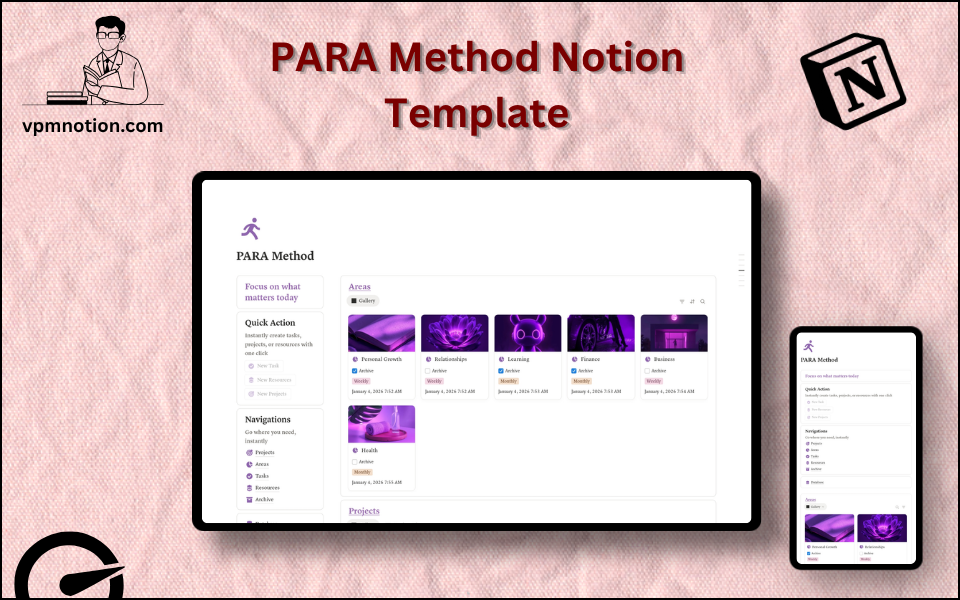
A Notion implementation of Tiago Forte's renowned PARA method — a productivity and knowledge organisation framework built around four core buckets: Projects, Areas, Resources, and Archive. This template provides a…
One-click duplication · Works on free Notion plans · Lifetime access
Overview
A Notion implementation of Tiago Forte's renowned PARA method — a productivity and knowledge organisation framework built around four core buckets: Projects, Areas, Resources, and Archive. This template provides a clean, structured workspace for implementing PARA and achieving a single source of truth for all personal and professional information.
Key Features
- 3 Quick Action Buttons — instantly create a Task, Project, or Resource entry
- Navigation Panel:
- Projects
- Areas
- Tasks
- Resources
- Archive
- Areas Database — ongoing responsibilities and life domains
- Projects Database — time-bound initiatives with specific outcomes
- Tasks Database — individual actions linked to projects and areas
- Resources Database — reference material, notes, and knowledge items
- Motivational Header — "Focus on what matters today" as a persistent daily reminder
What's Inside
Dashboard Layout
Two-column main layout:
- Left column: Motivational header, Quick Action callout (3 buttons), Navigation with 5 links, Database shortcut
- Right column: Areas database (top) + Projects database (bottom)
Lower two-column layout:
- Left column: Tasks database
- Right column: Resources database
Databases Included
Projects Database (time-bound, specific outcome)
- Project name and description
- Goal / desired outcome
- Status (Active, On Hold, Completed, Cancelled)
- Due date
- Linked area
- Key tasks and notes
Areas Database (ongoing, no end date)
- Area name (Health, Finance, Career, Family, Business, Learning, etc.)
- Standard of maintenance
- Status (Active, On Hold)
- Key projects and notes
Tasks Database (next actions)
- Task name
- Linked project
- Linked area
- Status (Not Started, In Progress, Completed)
- Due date and priority
- Notes
Resources Database (reference material)
- Resource title
- Topic or category
- Source / link
- Type (Article, Book, Video, Note, Template, etc.)
- Relevance to projects or areas
- Notes
Use Cases
- Implementing the PARA method from scratch for complete life and work organisation
- Transitioning from a messy Notion workspace to a structured PARA-based system
- Managing a career alongside personal development, health, and creative projects in one system
- Building a personal knowledge management (PKM) system using Resources as a second brain
- Coordinating multiple simultaneous projects without losing the context of long-term area responsibilities
- Using Archive as a knowledge repository and project retrospective database
Why You'll Love It
- Faithful implementation of Tiago Forte's PARA method in a clean Notion layout
- The four-database structure (Projects, Areas, Resources, Archive) creates comprehensive information organisation
- Quick action buttons implement PARA's "capture first" philosophy for frictionless input
- Navigation panel gives instant access to all four PARA buckets from the dashboard
- Archive database completes the PARA cycle by keeping inactive items accessible but out of the way
- Tasks database bridges the gap between project planning and daily action execution
Benefits
- Clarity — PARA's four-bucket framework eliminates information overload
- Completeness — covers all types of information from active tasks to reference material
- Flexibility — works for any combination of personal and professional responsibilities
- Daily Focus — "Focus on what matters today" header reinforces daily intentionality
- System Longevity — Archive prevents good information from being deleted while keeping it out of the way
Who It's For
- PARA Method enthusiasts who want a ready-to-use Notion implementation
- Knowledge workers building a second brain / PKM system
- Professionals managing complex responsibilities across multiple roles
- Students and academics organising research, coursework, and personal development
- Anyone overwhelmed by information and seeking a proven organisational system
- Readers of "Building a Second Brain" by Tiago Forte looking to implement the method
How It Works
- Define Your Areas — add all ongoing life and work responsibilities to the Areas database
- Create Active Projects — for each current initiative with an end goal, create a Project linked to an Area
- Capture Tasks — break projects into specific next actions in the Tasks database
- Save Resources — whenever you encounter useful information, add it to the Resources database
- Daily Work — use the Tasks database to identify today's most important next actions
- Weekly Review — check all four databases for stale projects, pending tasks, and relevant resources
- Project Completion — when a project is done, mark it completed and move related resources to Archive
- Area Review — monthly, review Areas to ensure your standard of maintenance is being met
Frequently Asked Questions
What is the PARA Method Notion template?
PARA Productivity System & Knowledge Management. A Notion implementation of Tiago Forte's renowned PARA method — a productivity and knowledge organisation framework built around four core buckets: Projects, Areas, Resources, and Archive.
Is the PARA Method template free?
Yes — PARA Method is completely free. Add it to your cart for $0 and duplicate it straight into your own Notion workspace in one click.
Who is PARA Method best for?
It's designed for PARA Method enthusiasts who want a ready-to-use Notion implementation; Knowledge workers building a second brain / PKM system; Professionals managing complex responsibilities across multiple roles.
What's included in PARA Method?
Key components include Project name and description, Goal / desired outcome, Status (Active, On Hold, Completed, Cancelled), Due date, Linked area.
Does PARA Method work on the free Notion plan and on mobile?
Yes. It works on both free and paid Notion plans and is fully usable on desktop, tablet, and the Notion mobile app. Just duplicate it to your workspace and start straight away.
Summary
The PARA Method Notion template is the complete implementation of one of the world's most respected personal productivity and knowledge management systems. By organising all information into Projects, Areas, Resources, and Archive, it creates the clarity, focus, and completeness that the PARA method promises — all within a clean, well-structured Notion workspace. Start your PARA journey today and build the second brain you've always needed.
No cost — yours in one click
14 sold
Get it Free- Instant Notion duplication
- Desktop, tablet & mobile
- Beginner-friendly setup
Related templates
Get PARA Method today
The PARA Method Notion template is the complete implementation of one of the world's most respected personal productivity and knowledge management systems. By…
Get it Free