 Students
Job & Internship Tracker Notion Template
Job Search & Career Opportunity Management
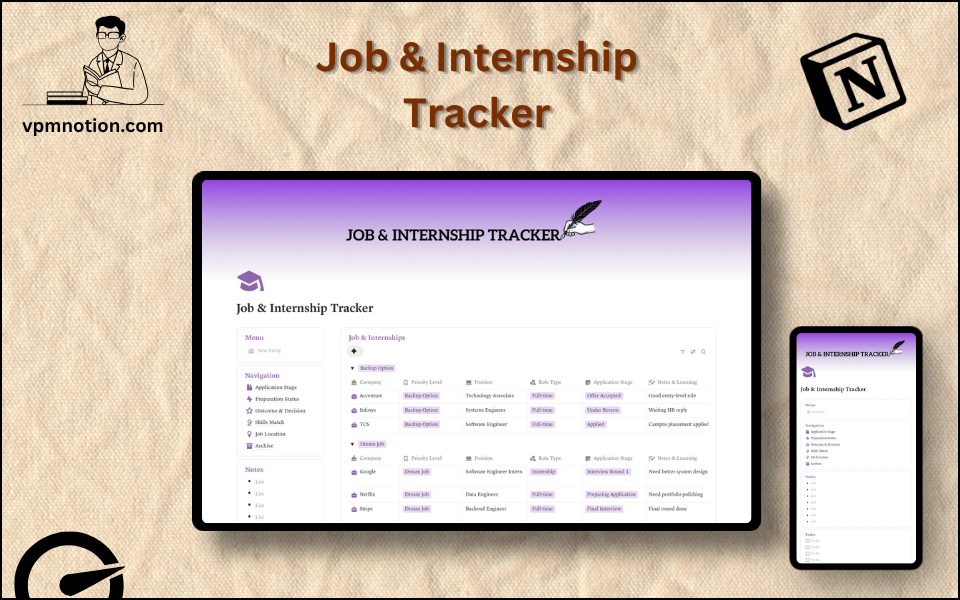
A structured job search management system for students, graduates, and career changers who are actively applying for jobs or internships. This template organises every application, tracks progress through the hiring…
One-click duplication · Works on free Notion plans · Lifetime access
Overview
A structured job search management system for students, graduates, and career changers who are actively applying for jobs or internships. This template organises every application, tracks progress through the hiring process, and keeps tasks and notes in one focused Notion workspace.
Key Features
- Quick Action Menu Button — add new job applications instantly
- Navigation Panel with filtered views:
- Application Stage
- Preparation Status
- Outcome & Decision
- Skills Match
- Job Location
- Archive
- Job & Internships Database — central record of all applications
- Company Research Database — supporting information for each target company
- Notes Section — quick capture for recruiter contacts, interview tips, and observations
- Tasks Section — checklist for application-related to-dos (prepare cover letter, follow up, etc.)
What's Inside
Dashboard Layout
Two-column layout:
- Left column: Menu callout (Quick Action button), Navigation with 6 views, Notes section, Tasks checklist, Company stats database
- Right column: Job & Internships database showing all active applications
Lower section: Additional full-width database for supplemental job search tracking
Databases Included
Job & Internships Database
- Company name and role title
- Application stage (Applied, Phone Screen, Interview Round 1/2/3, Final Round, Offer, Rejected)
- Preparation status (Not Prepared, Preparing, Ready)
- Outcome & decision (Pending, Accepted, Rejected, Withdrawn, On Hold)
- Skills match (Strong Match, Partial Match, Stretch Role)
- Job location (Remote, Hybrid, On-site, City/Country)
- Application date and follow-up date
- Salary range and benefits notes
- Company website and job listing link
Company Research Database
- Company overview and culture notes
- Interviewer names and LinkedIn profiles
- Key talking points for interviews
Navigation Views
- Application Stage — tracks where each application is in the hiring funnel
- Preparation Status — surfaces upcoming interviews needing prep
- Outcome & Decision — shows pending decisions and final outcomes
- Skills Match — prioritises strongest match applications
- Job Location — filters by work arrangement preference
- Archive — closed applications (rejected, accepted, or withdrawn)
Use Cases
- Managing a high-volume job search with 20+ simultaneous applications
- Tracking internship applications during campus recruitment season
- Preparing systematically for interviews by monitoring Preparation Status view
- Analysing job search effectiveness by reviewing outcomes across all applications
- Organising follow-up communication with recruiters and hiring managers
- Comparing job offers side-by-side using salary and benefits notes
Why You'll Love It
- Application Stage filtering provides a clear view of where each application stands in the process
- Preparation Status view shows which upcoming interviews need more preparation
- Outcome & Decision view tracks accepted, rejected, and pending decisions
- Skills Match analysis helps prioritise which roles align best with current skills
- Job Location filter is useful for remote vs. on-site preference management
- Notes and Tasks sections keep all action items tied to the job search in one place
Benefits
- Search Clarity — full pipeline view of all active applications prevents confusion
- Interview Readiness — preparation status tracking ensures no interview catches you off-guard
- Decision Support — outcome tracking makes offer comparison and decision-making easier
- Focus — skills match filtering helps allocate preparation time to best-fit roles
- Organisation — notes and tasks eliminate forgotten follow-ups and missed deadlines
Who It's For
- University and college students applying for internships and graduate positions
- Recent graduates launching their first career job search
- Career changers managing multiple applications in a new field
- Experienced professionals running a structured, discreet job search
- Anyone in active job search mode who needs more than a spreadsheet
How It Works
- Add an Application — use the Menu button to log a new job or internship application
- Fill in Details — set stage, skills match, location, and initial notes
- Track Progress — update application stage as you move through the hiring process
- Prepare for Interviews — update Preparation Status and add company research notes
- Log Outcomes — record interview feedback and final decisions for each role
- Follow Up — use the Tasks section to schedule recruiter follow-ups and deadline reminders
- Compare Offers — review active applications with offers to compare salary and role details
- Archive Concluded Applications — move rejected or withdrawn applications to Archive
Frequently Asked Questions
What is the Job & Internship Tracker Notion template?
Job Search & Career Opportunity Management. A structured job search management system for students, graduates, and career changers who are actively applying for jobs or internships.
Is the Job & Internship Tracker template free?
Yes — Job & Internship Tracker is completely free. Add it to your cart for $0 and duplicate it straight into your own Notion workspace in one click.
Who is Job & Internship Tracker best for?
It's designed for University and college students applying for internships and graduate positions; Recent graduates launching their first career job search; Career changers managing multiple applications in a new field.
What's included in Job & Internship Tracker?
Key components include Company name and role title, Application stage (Applied, Phone Screen, Interview Round 1/2/3, Final Round, Offer, Rejected), Preparation status (Not Prepared, Preparing, Ready), Outcome & decision (Pending, Accepted, Rejected, Withdrawn, On Hold), Skills match (Strong Match, Partial Match, Stretch Role).
Does Job & Internship Tracker work on the free Notion plan and on mobile?
Yes. It works on both free and paid Notion plans and is fully usable on desktop, tablet, and the Notion mobile app. Just duplicate it to your workspace and start straight away.
Summary
The Job & Internship Tracker Notion template is the career-launch toolkit for anyone in active job search mode. By tracking applications across multiple stages, monitoring interview preparation, and recording outcomes, it transforms a chaotic job search into a structured, manageable process. Whether applying for five roles or fifty, this template keeps your career search organised, proactive, and moving forward.
No cost — yours in one click
6 sold
Get it Free- Instant Notion duplication
- Desktop, tablet & mobile
- Beginner-friendly setup
Related templates
Get Job & Internship Tracker today
The Job & Internship Tracker Notion template is the career-launch toolkit for anyone in active job search mode. By tracking applications across multiple…
Get it Free