 Health & Fitness
Fitness Tracker Pro Notion Template
Complete Fitness, Nutrition & Body Transformation System
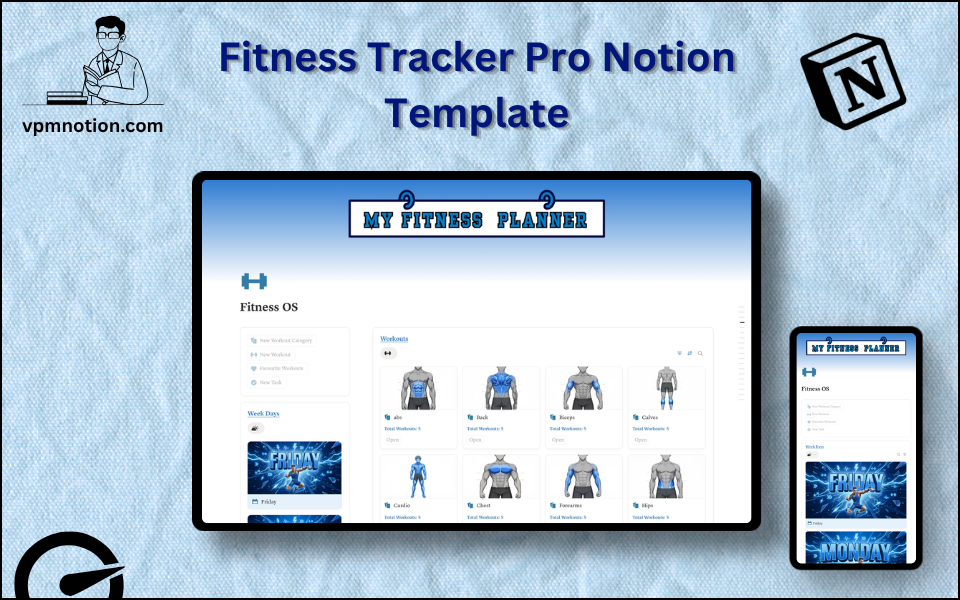
Fitness Tracker Pro is an all-in-one fitness command centre that brings workouts, progress logging, body calculators, meal planning, challenges, and weight-loss tracking into a single Notion dashboard. It is built for…
One-click duplication · Works on free Notion plans · Lifetime access
Overview
Fitness Tracker Pro is an all-in-one fitness command centre that brings workouts, progress logging, body calculators, meal planning, challenges, and weight-loss tracking into a single Notion dashboard. It is built for people who want to train with structure — planning a weekly split, logging every set and rep, watching the numbers change, and staying accountable without juggling four different apps.
Key Features
- Workout Dashboard — Week Days planner, Today's Workouts, This Week Workout History, and a Workouts gallery all on one screen
- Quick Action Buttons — "I Completed This", "Add to Fav", "Start Challenge", and one-click open buttons built directly into the databases
- Fitness Self Notes — a reflection area to jot daily observations on strength, diet, hydration, sleep, energy, and progress
- 5 Built-in Calculators — BMI, Body Fat %, BMR, TDEE, and Macro calculators powered by Notion formulas
- Workout Library — a categorised database of workouts with animations, favourites, and relation links to history and weekly plans
- Set-by-Set Logging — record weight (kg), reps, sets, RPE, duration, and notes for every session
- Weekly Workout Planner — assign workouts to each day of the week with rollups and progress pointers
- Challenges System — one-time and weekly challenges with a full challenge history log
- Weight-Loss Tracker — log weight over time and attach progress photos to visualise your transformation
- Nutrition & Meal Planning — meals database with calories/protein/carbs/fat, a grocery/cart system, and a weekly meal plan
- Income & Expenses — a lightweight budget tracker for supplements, gym, and food spending
- Progress Charts — visual chart views to track trends over time
What's Inside
Dashboard Layout
A full-width dashboard built from stacked callout sections:
- Week Days — gallery view of the weekly training split
- Calculators — quick access gallery linking to all five calculators
- Fitness Self Notes — daily reflection bullets (strength, diet, water, sleep, energy, progress)
- Workouts — gallery of the workout library
- This Week Workout History — list and table views of recent sessions
- Today Workouts — gallery filtered to the current day
- Tasks — a quick task list, plus chart views for progress trends
Databases Included
- Workouts DB — workout library with Workout Name, Category, Week Days, Workout History (relations), Favourite, animations, and formulas (Today?, This Week Status) plus action buttons (I Completed This, Add to Fav, Open)
- Workout History DB — session log with Weight (kg), Rep, Set, RPE (Easy/Medium/Hard), Duration (min), Date, and Notes
- Week Days DB — weekly split planner with day pointer, last-progress, and rollups
- Category DB — workout categories with workout counts
- Calculators — a hub linking to five calculator databases:
- BMI Calculator — Height, Weight → BMI, Result, Visualization
- Body Fat Calculator — Gender, Height, Waist, Neck, Hip → Body Fat %
- BMR Calculator — Age, Gender, Height, Weight, Body Fat % → BMR
- TDEE Calculator — adds Activity level (Sedentary → Athlete) → daily calorie needs
- Macro Calculator — Goal (Loss/Maintain/Gain) + Activity → protein/carbs/fat split
- One Time Challenge & Weekly Challenge — challenge libraries with Start Challenge buttons
- Challenges History DB — logs each challenge attempt with Status (In Progress / Completed / Give up)
- Weight Lose Main DB & Weight Lose Sub DB — weight tracking with dates and progress-photo attachments
- Nutrition — Items DB (grocery with price + cart buttons), Category DB, and Meals DB (Calories, Protein, Carbs, Fat, favourite)
- Meal Weekly Plan DB — assigns meals to each day of the week
- Income DB & Expense DB — track fitness-related income and spending
Navigation Pages
- Database — master page housing every sub-database (Workouts, Workout History, Week Days, Category, Calculators, Challenges, Weight Loss, Nutrition, Weekly Meal, Income & Expenses)
- Plan Weekly Workouts / Plan Weekly Meals — gallery planners for the week ahead
- My Weight Loss Journey Images — visual progress-photo gallery
Use Cases
- Planning a weekly workout split and following it day by day
- Logging every workout set, rep, and weight to track strength progression
- Calculating BMI, body fat, BMR, TDEE, and daily macros without leaving Notion
- Running 30-day or weekly fitness challenges and tracking completion
- Documenting a weight-loss journey with regular progress photos
- Meal prepping with a macro-aware meals database and auto-built grocery list
- Keeping fitness-related spending (gym, supplements, food) in check
Why You'll Love It
- Genuinely all-in-one — training, nutrition, body metrics, and finances live in one workspace
- Built-in calculators remove the need for external BMI/TDEE/macro tools
- Relation-linked databases mean workouts, history, week days, and categories all stay in sync automatically
- Action buttons make daily logging fast — complete a workout or start a challenge in one click
- Progress photos and weight history turn abstract goals into visible results
- Weekly planning views keep training consistent instead of random
- Scales from a casual gym-goer to a serious lifter tracking every variable
Benefits
- Consistency — weekly planners and daily views keep training on schedule
- Measurable Progress — set-by-set logging and charts make improvement visible
- Smart Insights — calculators turn body stats into actionable calorie and macro targets
- Motivation — challenges, favourites, and progress photos keep momentum high
- All-in-One — replaces a workout app, a macro calculator, a meal planner, and a spreadsheet
- Automation — relations and formulas update history, weekly status, and totals automatically
Who It's For
- Gym-goers and lifters who want to track strength progression over time
- Beginners who need calculators and structure to start training the right way
- Weight-loss seekers wanting visible accountability through photos and metrics
- Meal preppers who plan nutrition around calorie and macro goals
- Coaches and personal trainers looking for a client-ready tracking system
- Notion power users who want one dashboard for their entire fitness life
How It Works
- Set Up Your Split — assign workouts to each day in the Week Days planner
- Build Your Library — add exercises to the Workouts DB with category and animations
- Run the Calculators — enter your stats to get BMI, body fat, BMR, TDEE, and macros
- Train and Log — open today's workout and record weight, reps, sets, RPE, and notes
- Mark Complete — use the "I Completed This" button to push the session into history
- Plan Meals — add meals with macros and auto-generate a grocery cart
- Take a Challenge — start a weekly or one-time challenge and track it to completion
- Track Your Body — log weight and attach progress photos to your weight-loss journey
- Review Trends — check the chart and history views weekly to adjust your plan
Frequently Asked Questions
What is the Fitness Tracker Pro Notion template?
Complete Fitness, Nutrition & Body Transformation System. Fitness Tracker Pro is an all-in-one fitness command centre that brings workouts, progress logging, body calculators, meal planning, challenges, and weight-loss tracking into a single Notion dashboard.
How much does Fitness Tracker Pro cost?
Fitness Tracker Pro is a premium Notion template available for a one-time payment of $39 — no subscription. After checkout you can duplicate it into your Notion workspace and own it forever.
Who is Fitness Tracker Pro best for?
It's designed for Gym-goers and lifters who want to track strength progression over time; Beginners who need calculators and structure to start training the right way; Weight-loss seekers wanting visible accountability through photos and metrics.
What's included in Fitness Tracker Pro?
Key components include Workouts DB, Workout History DB, Week Days DB, Category DB, Calculators.
Does Fitness Tracker Pro work on the free Notion plan and on mobile?
Yes. It works on both free and paid Notion plans and is fully usable on desktop, tablet, and the Notion mobile app. Just duplicate it to your workspace and start straight away.
Summary
The Fitness Tracker Pro Notion template is a complete training, nutrition, and transformation system in one workspace. With a full workout library, set-by-set logging, five built-in body calculators, challenges, weight-loss photo tracking, and a macro-aware meal planner, it gives serious and casual athletes alike everything needed to plan, execute, and measure their fitness journey. Stop scattering your progress across apps — Fitness Tracker Pro keeps every rep, meal, and milestone in a single, beautifully connected dashboard.
One-time payment · lifetime access
1 sold
Get Template — $39- Instant Notion duplication
- Desktop, tablet & mobile
- Beginner-friendly setup
Related templates
Get Fitness Tracker Pro today
The Fitness Tracker Pro Notion template is a complete training, nutrition, and transformation system in one workspace. With a full workout library, set-by-set…
Get Template — $39