 Finance
Financial Tracker Notion Template
Personal & Business Financial Tracking
A clean, straightforward financial tracking system for monitoring income and expenses over time. This template provides a no-frills, highly functional approach to recording financial transactions, categorising spending…
One-click duplication · Works on free Notion plans · Lifetime access
Overview
A clean, straightforward financial tracking system for monitoring income and expenses over time. This template provides a no-frills, highly functional approach to recording financial transactions, categorising spending, and maintaining a clear picture of cash flow — all within Notion.
Key Features
- 2 Menu Action Buttons — quickly add income or expense entries
- Income History Database — complete log of all income received
- Expense History Database — complete log of all expenses incurred
- Monthly Summary Database — overview of financial data per time period
- Category/Tag Database — organise transactions by financial category
- Notes Section — quick capture for budget notes, financial goals, and reminders
- Quick Action Button — one-click capture for in-the-moment transaction logging
What's Inside
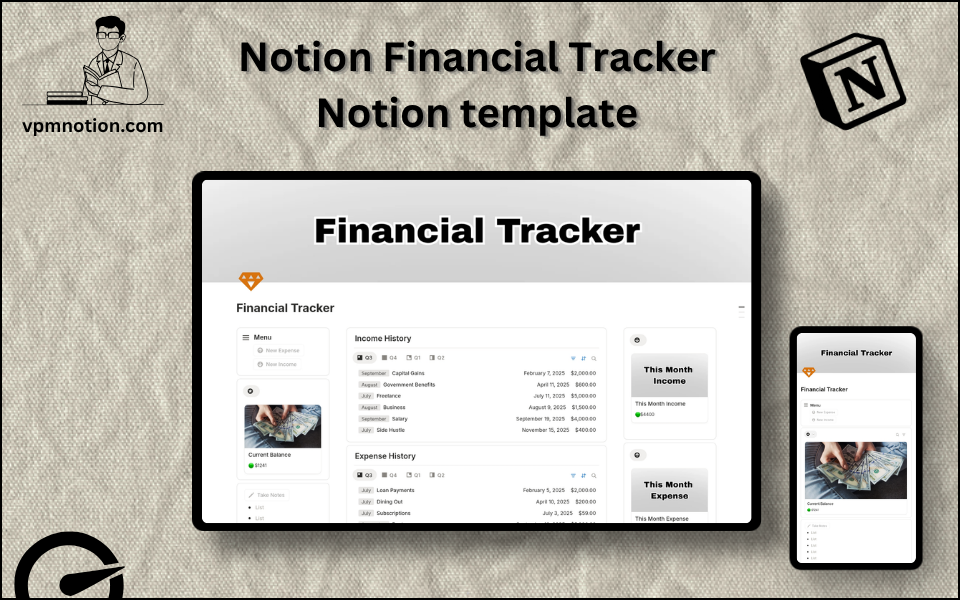
Dashboard Layout
Three-column main layout:
- Left column: Menu callout (2 buttons), summary/stats database, Quick Action button, notes section
- Middle column: Income History database (full log)
- Right column: Expense History database (full log) + secondary summary databases
Additional databases include category-based views and monthly aggregation
Databases Included
Income History Database
- Income source (Salary, Freelance, Investment, Bonus, Rental, etc.)
- Amount received
- Date
- Category
- Notes and payment method
Expense History Database
- Expense description
- Amount spent
- Date
- Category (Food, Transport, Housing, Utilities, Entertainment, Healthcare, etc.)
- Payment method (Cash, Card, Transfer)
- Notes
Monthly Summary Database
- Month and year
- Total income
- Total expenses
- Net savings
- Notes and observations
Category Database
- Category name
- Type (Income or Expense)
- Budget amount (optional)
- Linked transactions
Use Cases
- Tracking all monthly income from multiple sources (salary, freelance, investments)
- Logging daily expenses to build awareness of spending patterns
- Calculating net monthly savings and setting savings targets
- Reviewing expense categories to identify areas for budget reduction
- Preparing financial data for tax filing with an organised income record
- Monitoring business finances for self-employed professionals and freelancers
Why You'll Love It
- Separate Income and Expense databases create natural clarity for cash flow analysis
- Simple menu structure makes daily transaction logging fast and frictionless
- Category organisation enables spending pattern analysis over time
- Three-column layout provides broad financial visibility in a single view
- More structured than a spreadsheet; more flexible than a dedicated finance app
- No subscription required — completely free and private within Notion
Benefits
- Cash Flow Clarity — income vs. expense separation gives an instant understanding of financial health
- Spending Awareness — categorised expenses reveal where money actually goes
- Free Solution — no expensive app subscriptions needed
- Privacy — all financial data stored privately in your own Notion workspace
- Flexible — works for personal finances, freelance income, and small business tracking
Who It's For
- Individuals building their first structured personal budget
- Freelancers tracking variable income and project-related expenses
- Young professionals starting to take control of their financial life
- Small business owners monitoring basic business income and costs
- Students managing limited budgets with clear tracking
How It Works
- Set Up Categories — create income and expense categories that reflect your financial life
- Log Income — use Menu button to record each income entry as it arrives
- Log Expenses — after each spend, add a record with description, amount, and category
- Monthly Review — check the Monthly Summary database for total income, expenses, and savings
- Analyse Categories — review expense categories to find overspending areas
- Set Budgets — add monthly budget targets to the Category database
- Compare Budget vs. Actual — at month end, review whether category spending stayed within budget
- Year-End Review — review the full year's income and expense history for tax and planning purposes
Frequently Asked Questions
What is the Financial Tracker Notion template?
Personal & Business Financial Tracking. A clean, straightforward financial tracking system for monitoring income and expenses over time.
Is the Financial Tracker template free?
Yes — Financial Tracker is completely free. Add it to your cart for $0 and duplicate it straight into your own Notion workspace in one click.
Who is Financial Tracker best for?
It's designed for Individuals building their first structured personal budget; Freelancers tracking variable income and project-related expenses; Young professionals starting to take control of their financial life.
What's included in Financial Tracker?
Key components include Income source (Salary, Freelance, Investment, Bonus, Rental, etc.), Amount received, Date, Category, Notes and payment method.
Does Financial Tracker work on the free Notion plan and on mobile?
Yes. It works on both free and paid Notion plans and is fully usable on desktop, tablet, and the Notion mobile app. Just duplicate it to your workspace and start straight away.
Summary
The Financial Tracker Notion template is the simple, honest approach to personal financial management. By separating income from expenses, organising by category, and providing monthly summaries, it gives anyone the financial clarity they need to budget, save, and make smarter money decisions — without the cost or complexity of dedicated finance apps. Start tracking today and take control of where your money goes.
No cost — yours in one click
127 sold
Get it Free- Instant Notion duplication
- Desktop, tablet & mobile
- Beginner-friendly setup
Related templates
Get Financial Tracker today
The Financial Tracker Notion template is the simple, honest approach to personal financial management. By separating income from expenses, organising by…
Get it Free