 Productivity
Advanced To-Do List Notion Template
Advanced Task Management & Daily Productivity
A supercharged to-do list system that goes far beyond a simple checkbox list. This template combines a structured task database with quick capture, multiple action shortcuts, and a filtered view of active tasks — giving…
One-click duplication · Works on free Notion plans · Lifetime access
Overview
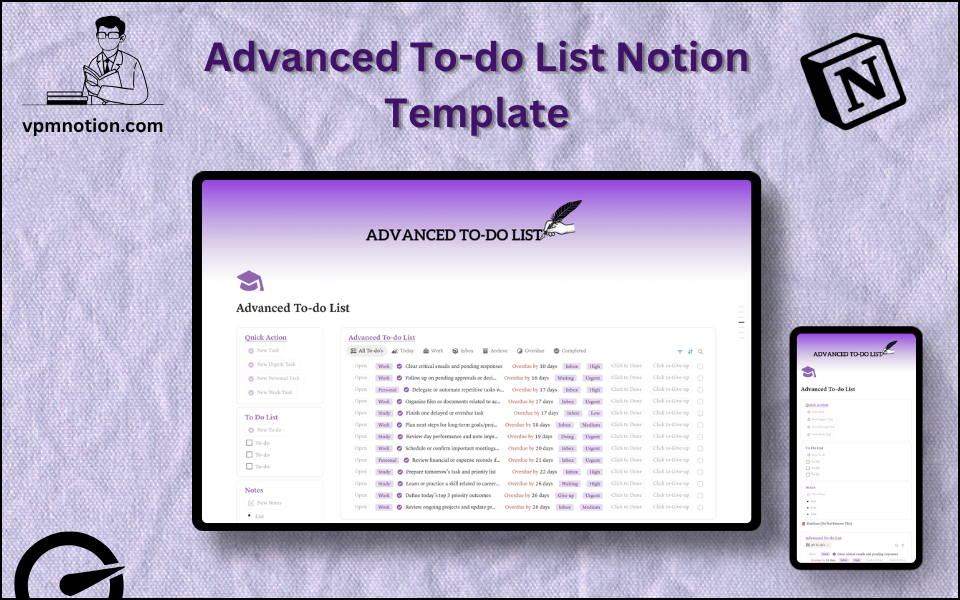
A supercharged to-do list system that goes far beyond a simple checkbox list. This template combines a structured task database with quick capture, multiple action shortcuts, and a filtered view of active tasks — giving individuals a powerful daily task management tool inside Notion.
Key Features
- 4 Quick Action Buttons — add tasks by category, urgency, or type in one click
- To-Do Checklist — simple inline checklist for quick, unstructured to-dos
- Notes Section — freeform capture for ideas and work-related observations
- Advanced To-Do List Database — full task database with filtering, sorting, and detailed properties
- Filtered Database Views — multiple ways to view and interact with the task list
What's Inside
Dashboard Layout
Two-column layout:
- Left column: Quick Action callout (4 buttons), To-Do List checklist callout, Notes callout, Database page link
- Right column: Advanced To-Do List database (inline, full view)
Databases Included
Advanced To-Do List Database
- Task name and description
- Status (Not Started, In Progress, Blocked, Done)
- Priority (Critical, High, Medium, Low)
- Category (Work, Personal, Errands, Health, Learning, etc.)
- Due date
- Time estimate
- Energy level required (High Focus, Low Focus, Administrative)
- Notes and context
- Completed date
Action Buttons (4 types)
Each button creates a pre-configured task entry with a different default category or priority:
- Add Work Task — creates a task tagged as Work
- Add Personal Task — creates a task tagged as Personal
- Add Urgent Task — creates a High-priority task
- Add Quick Note — creates a note-style entry
Use Cases
- Managing a daily mixed workload of professional tasks and personal errands
- Replacing a basic checklist with a searchable, filterable, priority-aware task system
- Planning the day with a morning review of all pending tasks by priority or due date
- Tracking recurring tasks (weekly, monthly) with notes and completion history
- Capturing ideas immediately using the freeform checklist, then converting to database entries
- Managing tasks for a side project or freelance work alongside regular job responsibilities
Why You'll Love It
- Four distinct action buttons allow tasks to be added with context (type or priority) immediately
- Combined approach of freeform checklist + structured database serves both quick capture and organised planning
- Database-driven to-do list supports filtering, sorting, and grouping that a basic checklist cannot provide
- Notes section captures thinking and context without forcing it into task structure
- Suitable for both daily personal task management and professional work planning
- Clean purple-themed aesthetic creates a focused, motivating workspace
Benefits
- Speed — four action buttons reduce task entry to a single click
- Power — database filtering and sorting far exceeds what a basic checklist offers
- Flexibility — checklist and database work together for different types of work
- Focus — priority filtering surfaces what matters most for today
- Clarity — categories and energy levels help plan tasks around personal capacity
Who It's For
- Productivity enthusiasts who want more power than a standard to-do app
- Professionals managing high task volume across multiple projects
- Students balancing academic tasks with personal commitments
- Freelancers organising client work and personal tasks in one system
- Anyone who finds simple to-do lists insufficient for their real task volume
How It Works
- Morning Capture — use action buttons to quickly add today's planned tasks
- Quick Notes — use the checklist for immediate, informal task capture
- Prioritise — review the database sorted by Priority to identify today's most important work
- Work by Energy — use Energy Level filtering to match tasks to your current mental capacity
- Update Status — as work progresses, update each task from Not Started → In Progress → Done
- End-of-Day Review — check for incomplete tasks and reschedule or reprioritise as needed
- Weekly Audit — archive or delete completed tasks to keep the active list clean
- Notes Capture — use the Notes callout throughout the day for ideas that aren't yet tasks
Frequently Asked Questions
What is the Advanced To-Do List Notion template?
Advanced Task Management & Daily Productivity. A supercharged to-do list system that goes far beyond a simple checkbox list.
How much does Advanced To-Do List cost?
Advanced To-Do List is a premium Notion template available for a one-time payment of $10 — no subscription. After checkout you can duplicate it into your Notion workspace and own it forever.
Who is Advanced To-Do List best for?
It's designed for Productivity enthusiasts who want more power than a standard to-do app; Professionals managing high task volume across multiple projects; Students balancing academic tasks with personal commitments.
What's included in Advanced To-Do List?
Key components include Task name and description, Status (Not Started, In Progress, Blocked, Done), Priority (Critical, High, Medium, Low), Category (Work, Personal, Errands, Health, Learning, etc.), Due date.
Does Advanced To-Do List work on the free Notion plan and on mobile?
Yes. It works on both free and paid Notion plans and is fully usable on desktop, tablet, and the Notion mobile app. Just duplicate it to your workspace and start straight away.
Summary
The Advanced To-Do List Notion template is the upgraded personal productivity tool for anyone who has outgrown basic checklist apps. With four action shortcuts, a full task database with priority, category, and energy tracking, and a combined checklist-plus-database approach, it provides the power and flexibility needed to manage a complex modern work and personal life — all in one clean, focused Notion workspace.
One-time payment · lifetime access
3 sold
Get Template — $10- Instant Notion duplication
- Desktop, tablet & mobile
- Beginner-friendly setup
Related templates
Get Advanced To-Do List today
The Advanced To-Do List Notion template is the upgraded personal productivity tool for anyone who has outgrown basic checklist apps. With four action…
Get Template — $10